
Workflows and optimization built around the tools you already pay for.
And around how your office works.
Prevail builds simple workflows inside the Microsoft 365 you already pay for, using SharePoint, Teams and Power Automate: one place to see your jobs, clients, files or deals, deadlines that track themselves, and an assistant that answers from your own documents. Here are a few demos.
Most of our builds use Microsoft 365, but we work in the tools you already use, from Google Workspace to QuickBooks and other practice software.
Every demo uses fictional data. Your version is built around your process.
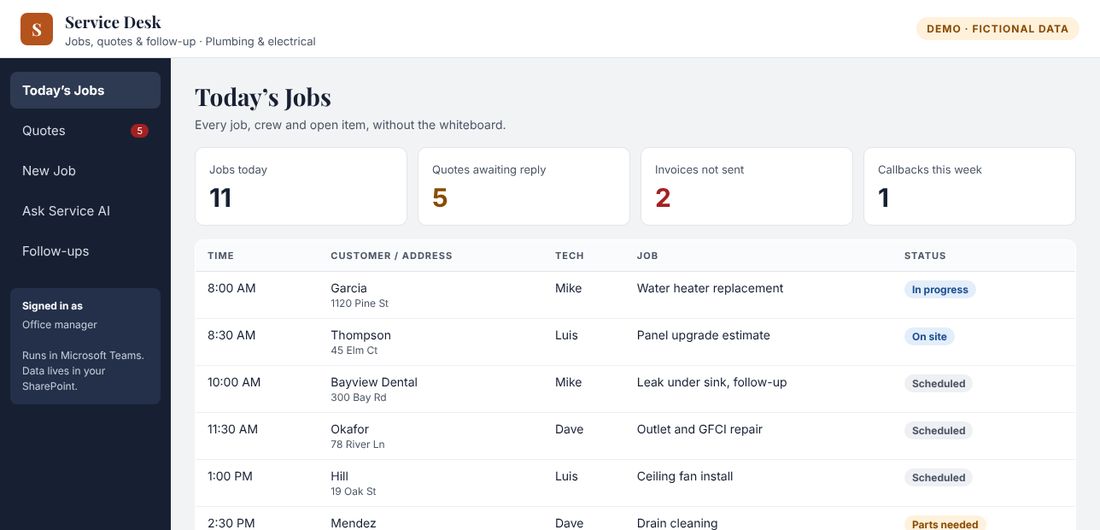
One place to run the work, by industry.
Service Desk
For plumbers, electricians & the trades
- Today’s jobs by tech, without the whiteboard
- Booking a job texts the customer and sets up the follow-up
- Quotes and invoices that don’t slip through the cracks
- Ask which quotes need a follow-up, and send it in one step
Practice Desk
For therapy & counseling practices
- A front-desk view of the day with admin gaps flagged
- New client intake that sends packets and consents automatically
- Reminders for expiring consents and missing paperwork
- Front-desk admin only. Clinical notes stay where they belong.
Case Desk
For private law firms: probate & estate administration
- A Microsoft 365 workflow for estate files, sorted by what’s due next
- Checklists, key deadlines and the client folder in one place
- Deadlines calculated from rules the attorney approves
- Ask questions in plain English and get answers from the firm’s own files
Transaction Desk
For real estate agents & teams
- Every deal sorted by the next contract deadline
- Enter a contract once and every deadline is calculated
- Contract-to-close checklists and deal folders set up for you
- Client status updates drafted for your approval
The fixes behind the tools.
Most offices don’t need new software. They need the process cleaned up, and the tools they already have set up to match.
Before & after: one process
For any office where work lives in inboxes and sticky notes
- We map how the work really flows and find where it breaks
- One checklist per request, with clear owners
- A dashboard showing what’s done, next and stuck
- Ask: “What’s waiting on me today?”
Client intake that doesn’t drop the ball
For any office that brings on new clients
- One online form starts everything
- Folder, welcome email and checklist set up automatically
- See every new client and what’s missing
- Ask who owes documents, and send reminders in one step
From file chaos to organized
For offices that can’t find the latest version of anything
- Organized SharePoint areas named the way you talk
- Clear permissions, so sensitive files stay private
- Teams set up for how you work together
- Ask where a file is, and get the right one
What working with Prevail looks like
Wondering what happens after you reach out?
- A free 30-minute Strategy Review, no obligation
- A written proposal before any work begins
- Quick wins first, then build and train
- Ongoing support as you grow
Picture a workflow like this in your office?
Tell us how your work flows today. We’ll show you what’s possible.
No obligation. You’ll get a written proposal before any work begins.