
AI that works in the tools you already pay for.
Set up safely. Actually used.
Copilot is built into Word, Outlook, Teams and Excel. In most small offices, it’s either not turned on, or a few licenses were bought and nobody really uses them.
We’re not selling AI. We help your team use Microsoft’s tools safely and well: get your files and permissions ready, put licenses where they help, and train your people on the work they already do.
For small offices and teams of about 2–50 people.
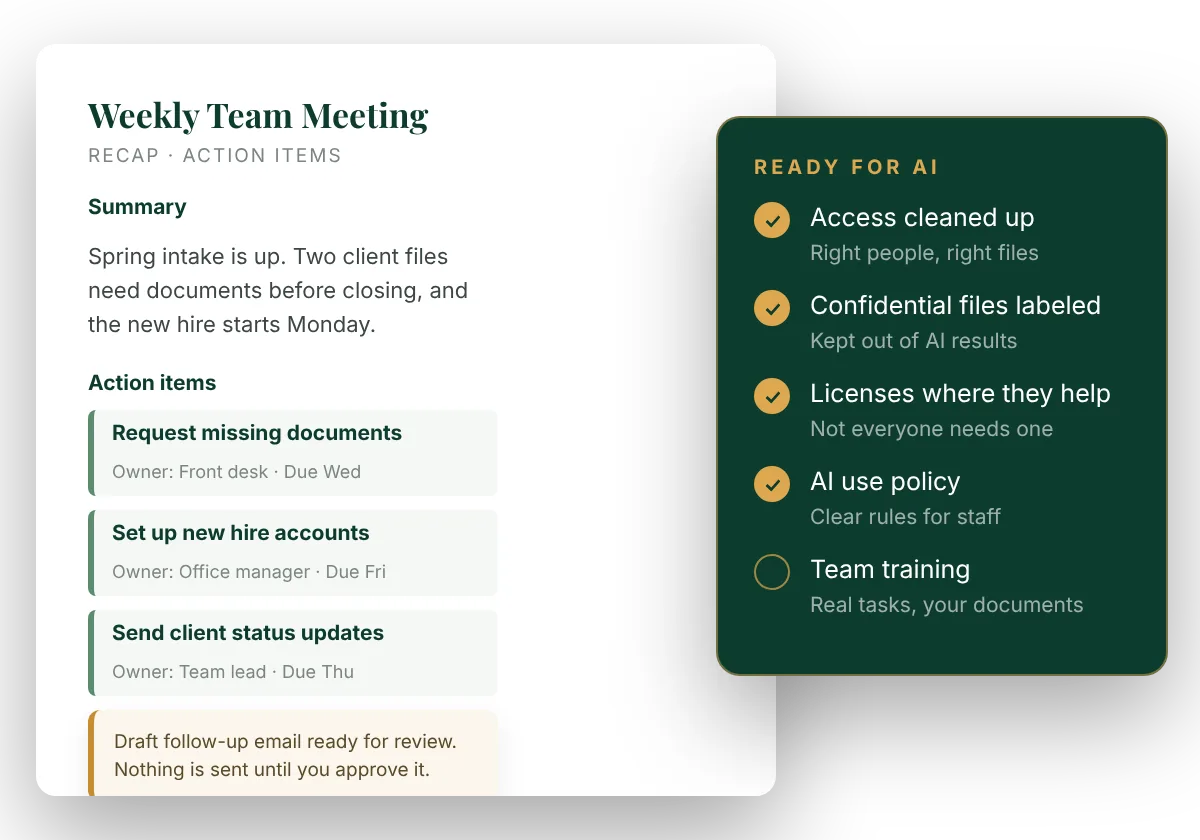
Less time on the busywork around the work.
Practical, everyday help inside Microsoft 365. A person still reviews anything that goes out.
Front office
Catch up on long email threads in seconds and get a first draft of the reply.
Meetings
A Teams recap with decisions, action items and who owns each one, ready when the call ends.
Billing & bookkeeping
Summarize an Excel report, spot what changed, and draft the client follow-up.
Client service
An assistant that answers from your own procedures: “How do we open a new client file?”
Owners & managers
Pull numbers and notes together, and get first drafts of proposals and plans from your templates.
Law firms
Microsoft added legal skills to Word. See our Copilot for Legal setup.
AI is only as careful as your files are organized.
Microsoft says it plainly: “Copilot respects access permissions and sensitivity labels.” That means it works from whatever each person can already open in Microsoft 365. In most small offices, that’s more than anyone realizes: old shared folders open to everyone, files saved in personal OneDrives, sensitive documents with no label at all.
So the first step isn’t turning AI on. It’s making sure the right people see the right files. That’s the part busy offices don’t have time for, and it’s exactly the work we do.
There has to be a better way than buying licenses and hoping for the best. There is: get ready first, then turn it on.
Ready, set up, and actually used.
AI Readiness
Clean up who can open what in SharePoint, Teams and OneDrive. Label confidential files. Write a simple AI use policy your staff can follow.
Copilot Setup
Licenses for the people who will actually use them, through Prevail as a Microsoft reseller. Your templates and procedures organized so Copilot can work from them.
Training & Adoption
Hands-on sessions built around your team’s real tasks, plus quick guides they’ll keep using after we leave.
30-Day Check-In
We look at what’s being used, what isn’t, and adjust licenses and training so you’re not paying for seats nobody opens.
Already on Microsoft 365
Or ready to move to it. Microsoft 365 is our lead, but we also work in Google Workspace, QuickBooks and the industry software you use.
No IT department
Big enough to have years of files and permissions to sort out, small enough that nobody owns it.
Curious, but careful
You want the time savings without putting client information at risk.
We bought a few Copilot licenses. Honestly, nobody really uses them, and we’re not sure what’s safe.
Every office starts in a different place, so we quote after a short conversation about your setup. Contact us for a quote. Licenses can be added to your existing Microsoft 365 through Prevail, so you have one place to call.
You want AI to replace your staff.
We help your people work better with Microsoft’s tools, not automate them away.
You already have an IT team rolling it out.
Larger organizations with in-house IT usually have this covered.
You want it on without the cleanup.
We won’t skip the readiness step. It’s what keeps client information safe.
Thinking about Copilot for your office?
Book a free 30-minute Strategy Review. We’ll talk through your setup and what to do first.
No obligation. You’ll get a written proposal before any work begins.